Track Chain
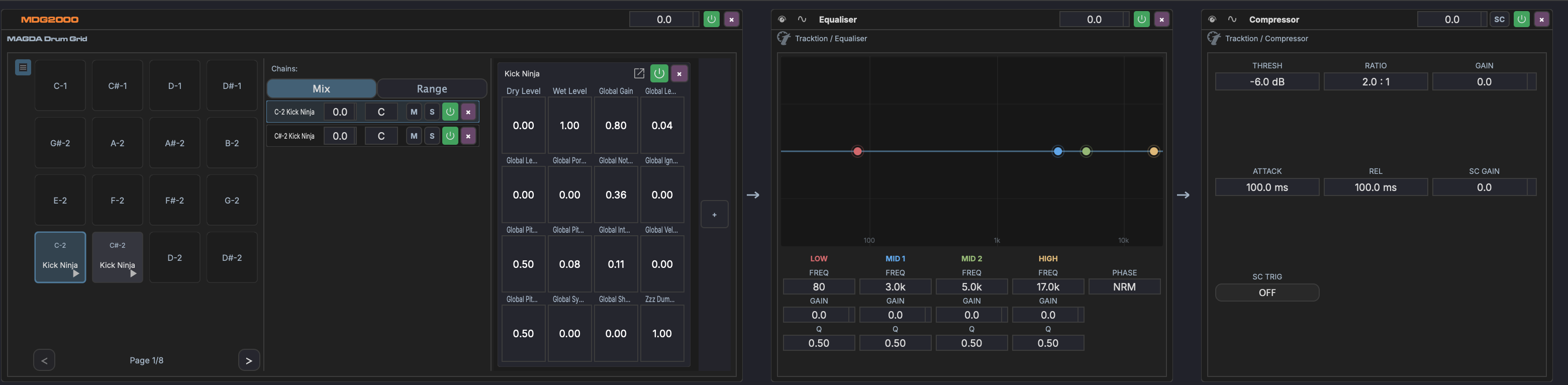
Displayed in the bottom panel when a track or device is selected. Shows the track's FX chain as a horizontal strip of devices:
- Drag devices to reorder them in the chain
- Click a device to select it and show its parameters in the Inspector
- Drag plugins from the Plugin Browser onto the chain to add them
- Right-click a device for options: bypass, remove, replace, move to rack
- Racks are shown as expandable containers with nested parallel chains
Header controls
 Rack — Create a new rack on the track
 Tree — Open the track tree, a hierarchical view of all devices and racks
- Track name, M (mute), S (solo), volume, pan — Quick access to track controls
 Bypass — Bypass the entire track chain