Drum Grid Editor
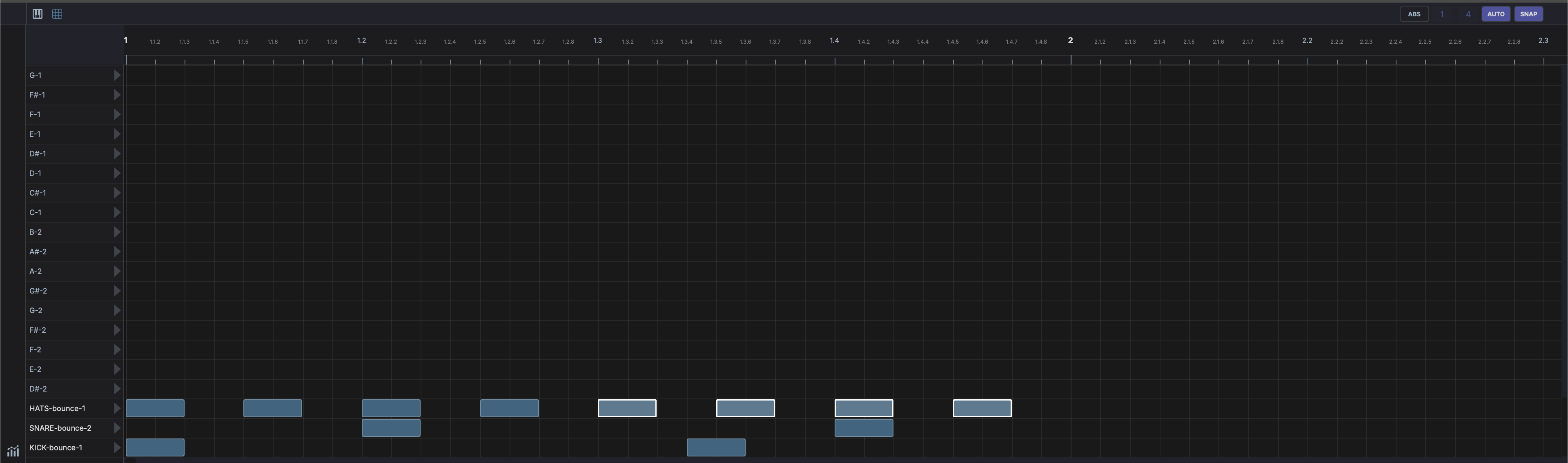
Displayed in the bottom panel when a drum clip is selected or a DrumGrid device is active. Shows a step-sequencer-style grid:
- Rows represent drum pads / MIDI notes
- Columns represent time steps
- Click cells to toggle hits on/off
- Velocity per hit is adjustable
- Live input highlight — with the track's input monitoring on, pad rows light up as you play them and the played row scrolls into view
Header controls
- Grid resolution — Draggable numerator/denominator for grid subdivision
- AUTO — Automatically adjust grid resolution based on zoom level
- SNAP — Toggle snap-to-grid
- Slice — Split each selected note into equal pieces (see Slicing Notes)
- Time Bend — Redistribute selected note timing along a curve (see Time Bend)
- Overlay tracks — Show other tracks' notes as a ghost overlay, same as in the Piano Roll. Ghost hits land on the row matching their pitch; notes that do not map to a pad row are skipped.
- Loop - Toggle the clip's own source loop on or off
- Fullscreen — Pinned to the far right, this toggle expands the editor to fill the window. Click again to restore. Shared with the Piano Roll.
Sidebar controls
- Audition - Toggle hit preview (see Auditioning Hits)
- Fold — Collapse the grid to only the pads in use, hiding empty lanes (Fold to used pads)
- CC — Add a CC or pitchbend lane to the drawer, the same way as in the Piano Roll. The menu offers Pitchbend, common controllers (CC 1 (Mod Wheel), CC 7 (Volume), CC 11 (Expression), CC 64 (Sustain)), and Custom CC...
Footer controls
 Velocity — Toggle the velocity lane at the bottom of the editor
Auditioning Hits
The speaker toggle in the top-left gutter previews hits through the track's instrument. With it lit, clicking a cell or pressing a pad sounds that note. It works the same as in the Piano Roll, and the setting is shared between the two editors. The pad-row play buttons always audition, whatever the toggle state.
Shift + wheel over a hit edits its velocity, exactly as in the Piano Roll.
Row Labels and Roles
Each pad row can carry a custom name and an instrument role. The role is a semantic label (what the pad is: a kick, a snare, a closed hat) and shows as a small coloured pill next to the row, abbreviated to a short tag like K, S, or HH.
Right-click a row to set both:
- Set instrument - choose a role from the submenu, or None to clear it.
- Rename label... - give the row a custom name.
- Clear label - remove the custom name.
- Clear role - remove the role (leaving the pad unlabelled).
Roles are also what the Drummer agent reads and writes, so labelling your pads lets the AI place hits on the right voices.
The available roles and their short tags:
| Role | Tag | Role | Tag |
|---|---|---|---|
| Kick | K | Ride | R |
| Snare | S | Ride Bell | RB |
| Snare Rim | SR | Crash | CR |
| Clap | C | Tom High | TH |
| Closed Hat | HH | Tom Mid | TM |
| Open Hat | OH | Tom Low | TL |
| Pedal Hat | PH | Perc 1-4 | P1-P4 |
Drumkits
A drumkit saves a grid's row layout - each pad's note, custom label, and role - so you can reuse it across projects. Right-click a row to manage kits:
- Save as drumkit... - name and save the current grid's row layout.
- Apply template - apply a built-in template or one of your saved drumkits to the current grid.
Drumkits store pad metadata (notes, labels, roles), not the samples themselves.
See Drum Grid for the DrumGrid device itself, including per-pad sample loading, FX chains, and envelopes.