4OSC Synth
The 4OSC Synth is a four-oscillator subtractive synthesizer provided by the Tracktion Engine. It offers a full synthesis signal path with oscillators, filters, envelopes, LFOs, effects, and an internal modulation matrix.
Overview
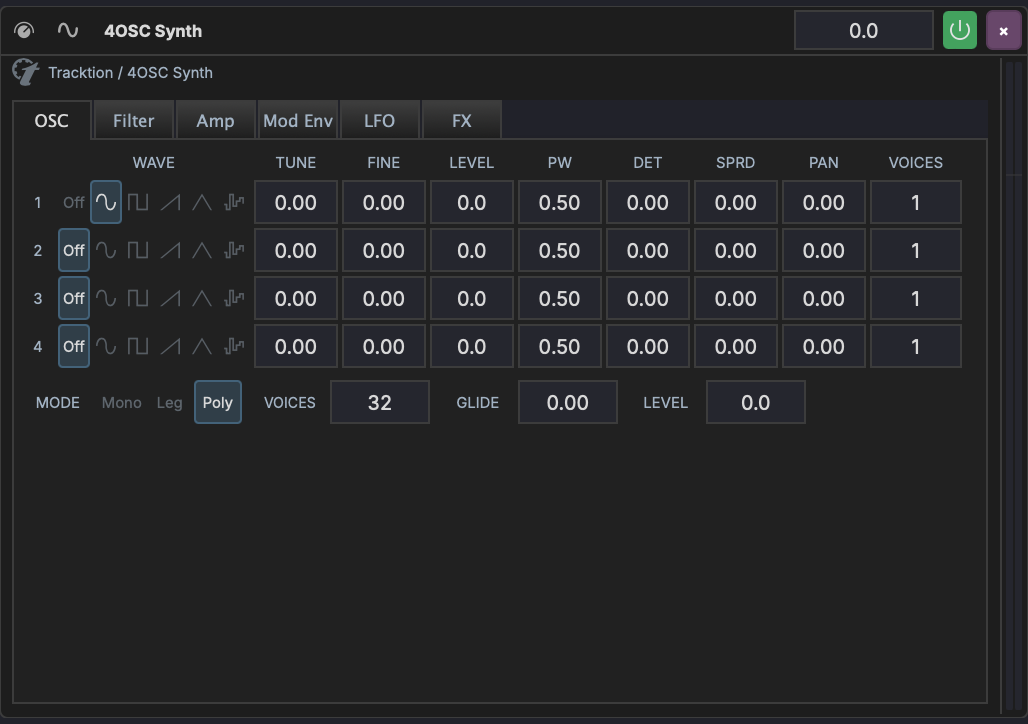
The 4OSC interface is organized into six tabs:
| Tab | Content |
|---|---|
| OSC | Four oscillators with wave shape, tuning, level, pulse width, detune, spread, pan, and unison voices |
| Filter | Multimode filter with cutoff, resonance, key tracking, velocity, and a dedicated filter envelope |
| Amp | Amplitude envelope (ADSR) with velocity sensitivity and analog mode |
| Mod Env | Two modulation envelopes with ADSR controls and mod destination assignments |
| LFO | Two LFOs with wave shape, rate, depth, tempo sync, and mod destination assignments |
| FX | Built-in distortion, reverb, delay, and chorus effects |
OSC Tab
Each of the four oscillators has:
| Parameter | Description |
|---|---|
| Wave Shape | Sine, triangle, square, sawtooth, pulse, noise |
| Tune | Coarse tuning in semitones |
| Fine | Fine tuning in cents |
| Level | Oscillator volume in dB |
| Pulse Width | Pulse width for pulse/square waves |
| Detune | Unison detune amount |
| Spread | Stereo spread of unison voices |
| Pan | Stereo position |
| Voices | Number of unison voices |
Below the oscillators are global controls:
| Parameter | Description |
|---|---|
| Mode | Mono, Legato, or Poly voice mode |
| Voices | Maximum polyphony (poly mode) |
| Legato | Legato glide time |
| Master Level | Master output level in dB |
Filter Tab
A multimode filter with its own envelope:
- Type — Low-pass, high-pass, band-pass, notch
- Slope — 12 dB or 24 dB per octave
- Freq — Cutoff frequency
- Resonance — Filter resonance
- Key Track — How much the cutoff follows the note pitch
- Velocity — How much velocity affects the cutoff
- Amount — Filter envelope depth
The filter envelope has independent Attack, Decay, Sustain, and Release controls.
Amp Tab
The amplitude envelope shapes the volume of each note:
- Attack, Decay, Sustain, Release — Standard ADSR
- Velocity — How much velocity affects the volume
- Analog — Adds subtle per-voice variation for an analog feel
Mod Env Tab
Two modulation envelopes (Env 1 and Env 2) that can be routed to any synth parameter via the internal mod matrix. Each has Attack, Decay, Sustain, and Release controls.
Assigning Mod Envelope Destinations
Below the envelope controls, use the + Env 1 and + Env 2 buttons to assign a modulation destination:
- Click + Env 1 (or + Env 2)
- Select the destination parameter from the dropdown
- Click Add
- Drag the depth slider to set the modulation amount (-100% to +100%)
- Click X to remove an assignment
LFO Tab
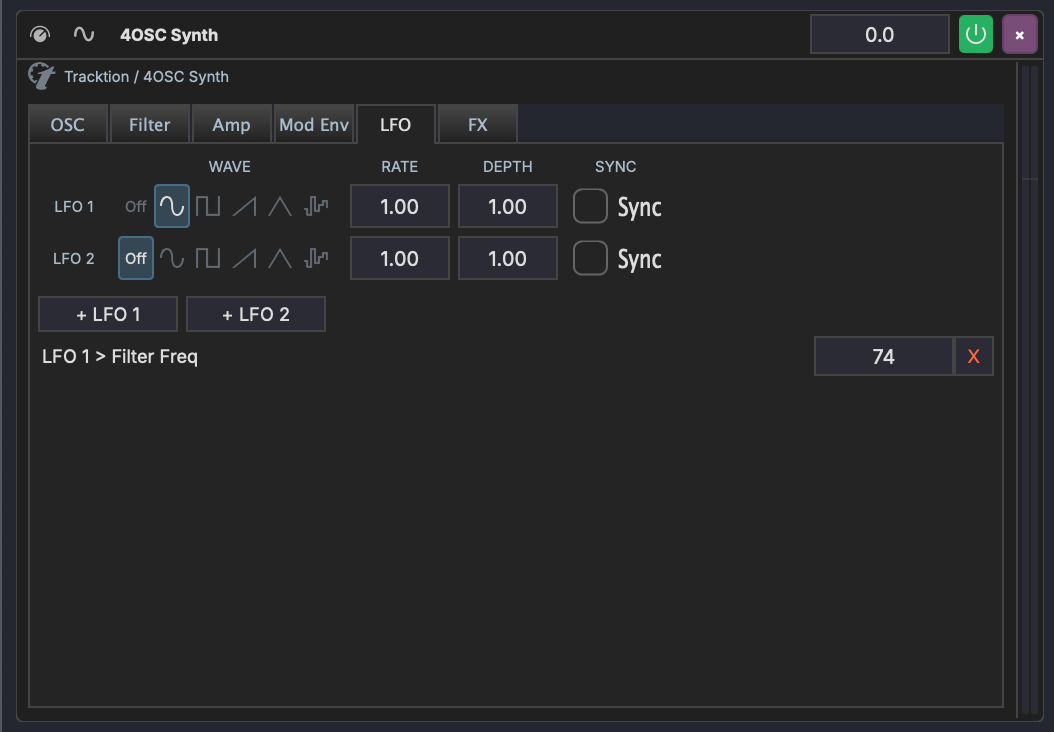
Two LFOs with independent controls:
| Parameter | Description |
|---|---|
| Wave | Sine, triangle, square, sawtooth, sample & hold, noise |
| Rate | LFO speed |
| Depth | LFO intensity |
| Sync | Lock rate to project tempo |
Assigning LFO Destinations
Below the LFO controls, use the + LFO 1 and + LFO 2 buttons to assign modulation destinations. The workflow is the same as for mod envelopes:
- Click + LFO 1 (or + LFO 2)
- Select the destination parameter from the dropdown
- Click Add
- Drag the depth slider to set the modulation amount (-100% to +100%)
- Click X to remove an assignment
Each assignment appears as a row showing the source and destination (e.g. "LFO 1 > Filter Freq") with a depth slider.
FX Tab
Built-in effects that can be toggled on or off independently:
| Effect | Parameters |
|---|---|
| Distortion | Amount |
| Reverb | Size, Damping, Width, Mix |
| Delay | Feedback, Crossfeed, Mix |
| Chorus | Speed, Depth, Width, Mix |
Internal Modulation vs Track Modulators
The 4OSC's internal mod matrix (LFO and Mod Env assignments) operates inside the synth's audio processing. This is separate from MAGDA's track-level modulators, which are external LFOs and curves that can target any device parameter on the track.
Both systems can be used simultaneously — for example, you might use the 4OSC's internal LFO 1 for filter wobble while using a track-level LFO for panning.
AI Sound Design (/design)
The AI Assistant panel includes a /design slash command that generates a 4OSC preset from a natural-language description. Focus a 4OSC device, type /design <description> in the chat, and the assistant fills in the wave shapes, filter type, voice mode, FX gates, ADSR envelopes, and parameter values directly on the device.
The result is a starting point — the AI is consistent within musical genres but won't replace tweaking by ear. Once you're happy, click the device header's save button. The dialog auto-fills the preset name and category the AI chose, so saving is just two clicks.
Quick usage
Run /design --help in the AI chat for an in-app cheat sheet with example prompts.
Design Recipes
These prompts are tuned for the AI agent's vocabulary. They produce reliable results — adjust the wording slightly to nudge the sound in different directions.
Bass
| Prompt | Result |
|---|---|
/design deep sub bass |
Pure sine sub with snappy envelope, mono voicing |
/design fat reese bass with movement |
Detuned saws + slow filter / LFO movement |
/design acid bass with resonant filter |
Square + saw with resonant low-pass, mono with envelope mod |
/design 808-style bass with sub and click |
Sine sub plus short attack click, decay envelope |
/design dub-style bass with delay |
Filtered saw, mono voicing, delay FX gate on |
Lead
| Prompt | Result |
|---|---|
/design fat detuned saw lead with octave layer |
Two detuned saws + octave-up square, legato voicing |
/design trance supersaw lead |
Multiple detuned saws, wide stereo, polyphonic |
/design bright square lead with chorus |
Square wave with PWM, chorus FX engaged |
/design legato mono synth lead with portamento |
Mono legato voicing with legato parameter set |
/design screaming acid lead |
Saw + square, high resonance, distortion gate on |
Pad
| Prompt | Result |
|---|---|
/design warm analog pad |
Detuned saws, slow attack/release, gentle filter envelope |
/design evolving ambient pad with slow filter |
Long ADSR, LFO on filter cutoff, reverb gate on |
/design string ensemble pad |
Multiple saws with detune, slow attack, polyphonic |
/design dark cinematic drone |
Long release, low filter, reverb gate on |
/design lush chord pad |
Polyphonic, chorus gate on, medium attack |
Pluck
| Prompt | Result |
|---|---|
/design snappy saw pluck |
Saw with zero attack, short decay, low sustain |
/design muted soft pluck for arpeggios |
Triangle/sine with rolled-off filter, short envelope |
/design FM-style bell pluck |
Sine + sine with detune, short envelope |
Keys / Other
| Prompt | Result |
|---|---|
/design electric piano with chorus |
Sine fundamentals, chorus gate on, medium decay |
/design rising white noise sweep |
Noise oscillator, filter envelope sweeping up |
/design impact hit with reverb tail |
Short snap with reverb gate engaged |
Tips
- Focus the device first.
/designwrites to whichever 4OSC device is selected. Without a focused device the chat shows the preset only. - Use a single sentence. "Aggressive distorted reese bass with movement" works better than a multi-sentence brief.
- Mention specific FX. Saying "with reverb" / "with delay" / "with chorus" / "with distortion" engages the matching FX gate. Without these words the FX blocks stay bypassed even if their values are set.
- Mention voicing. "Mono lead", "legato bass", "polyphonic pad" — the AI honours these.
- Mention root. Octaves, fifths, and thirds work; the AI keeps at least one oscillator at the root unless you ask for a chord stack.
- Iterate. If a result is too dark, run
/design <same prompt> brighter. The AI re-rolls from scratch each time, but the prompt vocabulary is consistent enough that small wording changes nudge the sound in predictable directions. - Save with category. The save dialog has a Category field; the AI fills it (e.g.
Bass / Deep Sub) so your bank stays organised.