Inspector
The Inspector panel is on the right side of the window. It displays context-sensitive properties for the currently selected item.
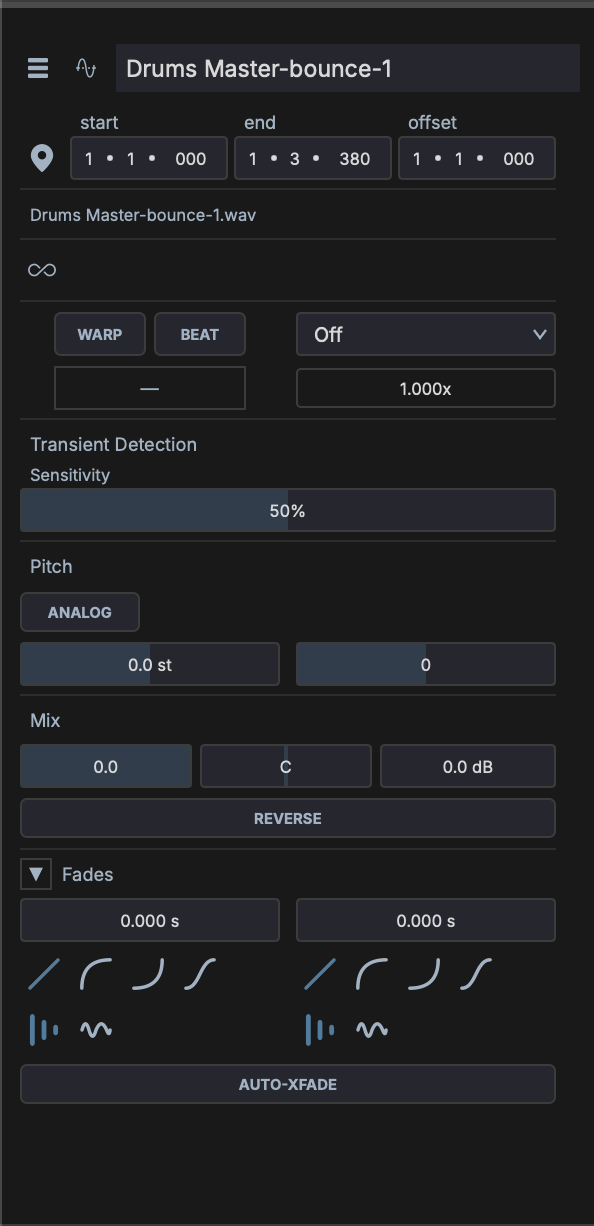
Track Inspector
Displayed when a track is selected. Shows:
- Track name — Click to rename
- Track color — Click the color swatch to choose a custom color, or leave as auto-assigned
- Volume and pan — Numeric readouts and controls
- Input routing — Select audio/MIDI input source
- Output routing — Select audio/MIDI output destination
- Sends — List of send slots with level controls
Clip Inspector
Displayed when a clip is selected. Shows:
- Clip name - Click to rename
- Clip color - Click the color swatch to choose a custom color
- Position - Start, end, and length on the timeline (beats)
- Loop settings - Loop on/off, loop start, loop end, phase / offset (beats)
Audio Properties
For audio clips, the inspector shows additional controls. Position and loop fields are expressed in beats rather than seconds; the only seconds value in the clip model is the source file's on-disk duration, shown as a read-only reference.
- Playback - Source BPM (editable), total beats, and Auto Tempo toggle. With Auto Tempo on, the clip stretches so its beat count stays fixed as the project tempo changes; with it off, the clip plays at its native sample rate
- Warp - Enable per-segment time-stretching via warp markers
- Transient Detection - Sensitivity slider for transient markers
- Pitch - Transpose in semitones; Auto-Pitch mode (Off, Pitch Track, Chord Mono, Chord Poly); Analog Pitch toggle for resampling instead of time-stretch
- Mix - Volume, gain, pan, and reverse
- Channels - Channel routing for stereo / mono interpretation
- Fades - In / out length and curve
Session Launch & Follow
When a clip lives in Session View, the inspector adds:
- Launch Mode - Trigger (one-shot) or Toggle
- Launch Quantize - Bar / beat snap for launch timing
- Follow Action - Action when the clip ends: None, Play Next, Play Previous, Play Random, Stop, Play Again
- Follow Delay (beats) - Delay between the clip ending and the follow action firing (0 - 64 beats)
- Follow Loops - Number of loops the clip plays before the follow action fires
Note Inspector
Displayed when one or more MIDI notes are selected in the Piano Roll. Shows:
- Pitch — MIDI note number and name
- Velocity — Note velocity (0–127)
- Start — Note start position
- Length — Note duration
When multiple notes are selected, the inspector shows ranges (e.g., "C3–G5") and allows batch editing.
Device Inspector
Displayed when a device (plugin or built-in) is selected in the track chain. Shows:
- Device name — Click to rename the instance
- Device type — Plugin format and category
- Parameters — All exposed parameters with knobs/sliders